Shin Onigashima Guide Getting Started & How to Play
Prologue
Once upon a time… In Nagakushi village, there lived an old man and an old woman. They had no children of their own, so they prayed to the Jizo̅ statues.
One night, the old man had a dream. "Tomorrow, you will be blessed with a baby girl."
The old woman also had a dream. "Tomorrow, you will be blessed with a baby boy."
New game
From the title screen, press START to open the menu menu. Only one menu command is available at first:
- さいしょから (New Game)
You will be prompted to switch the Disk side. Eject Disk 1 Side A, turn it to Side B and put it back in. After a few seconds, the game will load up Chapter 1.
Saving and Loading
You can save the game at any point during a chapter by pressing the START button. At the end of each chapter you are also prompted to save.
in both cases, you must insert Disk 1 Side A. This will return you to the title screen. There will now be a new option on the main menu:
- せーぶしたところから (Load Saved Game)
Disk 2 (Kouhen)
After beating Chapter 4, a third option appears on the main menu:
- こうへんのはじめから (From the beginning of Part 2)
Selecting this allows you to continue the story on Disk 2. This disk was originally sold separately.
Screen Layout
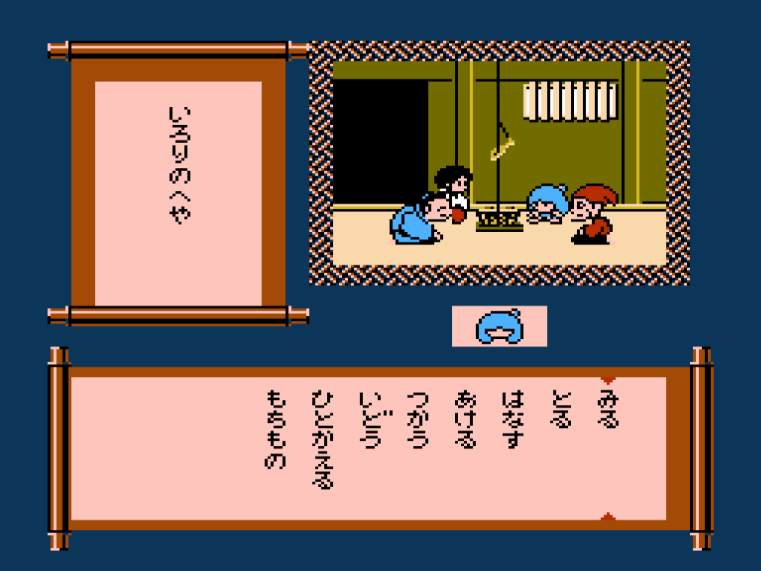
Shin Onigashima is a menu-based adventure game. The current scene is shown in the top-right. The scrolls along the bottom and left display different information at different times.
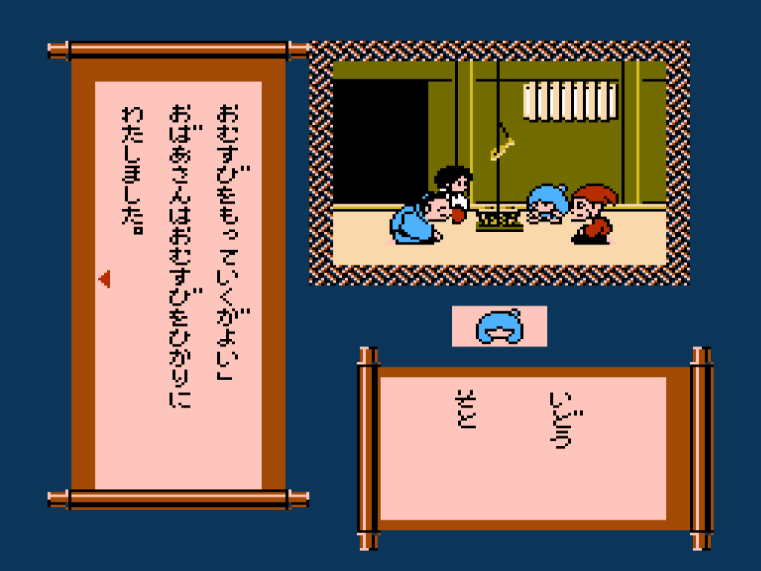
Commands
You interact with the world by selecting commands from a menu. After selecting a command, you will usually be shown a list of objects or characters in the current scene to interact with.
By selecting certain commands, you can reveal more in the scene, discover new places to go or find more characters to talk to.
Basic commands
The basic commands change depending on where you are and who is in the scene with you.
- みる (Look)
Look at something. Try looking at everything to learn more about it. - あける (Open)
Open something, like a door or a box. - はなす (Talk)
Talk to another character. You can talk to the other members of your party as well. - とる (Pick Up)
Pick up an object and add it to your inventory. - いどう (Move)
Move to a different location. - つかう (Use)
Use an item in your inventory. - いれる (Put)
Put something into something else. - わたす (Give)
Give an inventory item to somebody. - たおす (Defeat)
Fight a monster… or something else. - つける (Dress)
Put clothes on somebody.
Character commands
The following commands are available when you have both Donbe and Hikari in your party:
- ひとかえる (Change Character)
Switch between Donbe and Hikari. - もらもの (Exchange Items)
Swap an inventory item between Donbe and Hikari.
Change Character
When you have both Donbe and Hikari in your party, each character has their own inventory, dialogue and special abilities.
Some characters will react differently depending on which character is in the lead.
Your current character's face appears under the scene.

Game Over
Sometimes you'll do something dangerous or enter a challenge unprepared. This can lead to a Game Over. Restart the current chapter to try again.
